
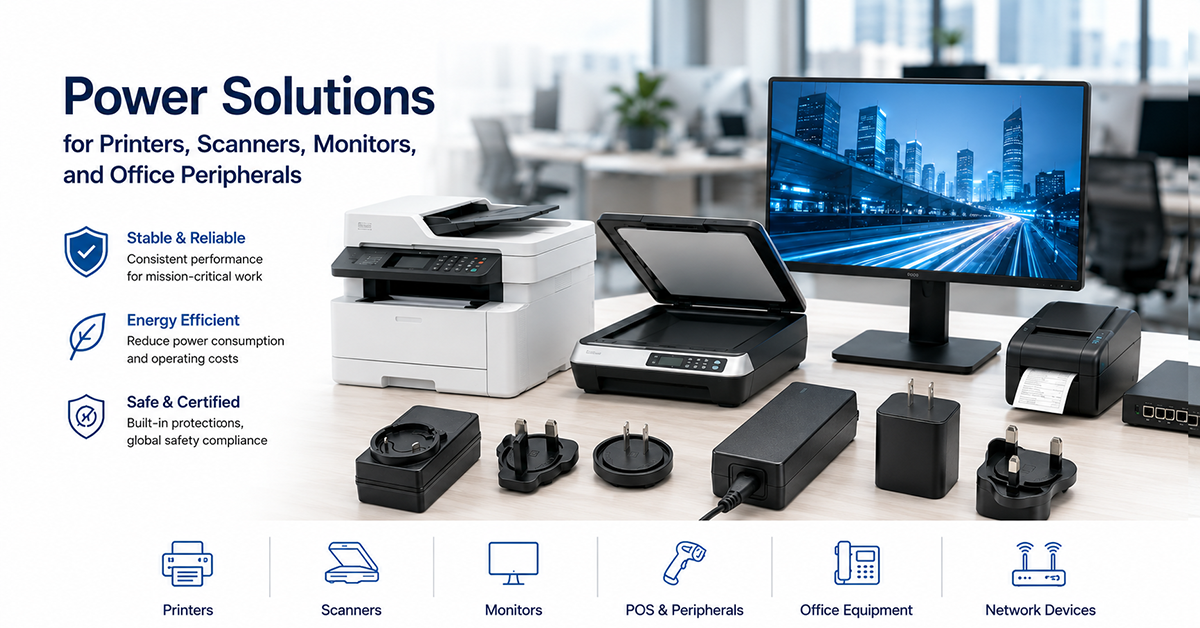
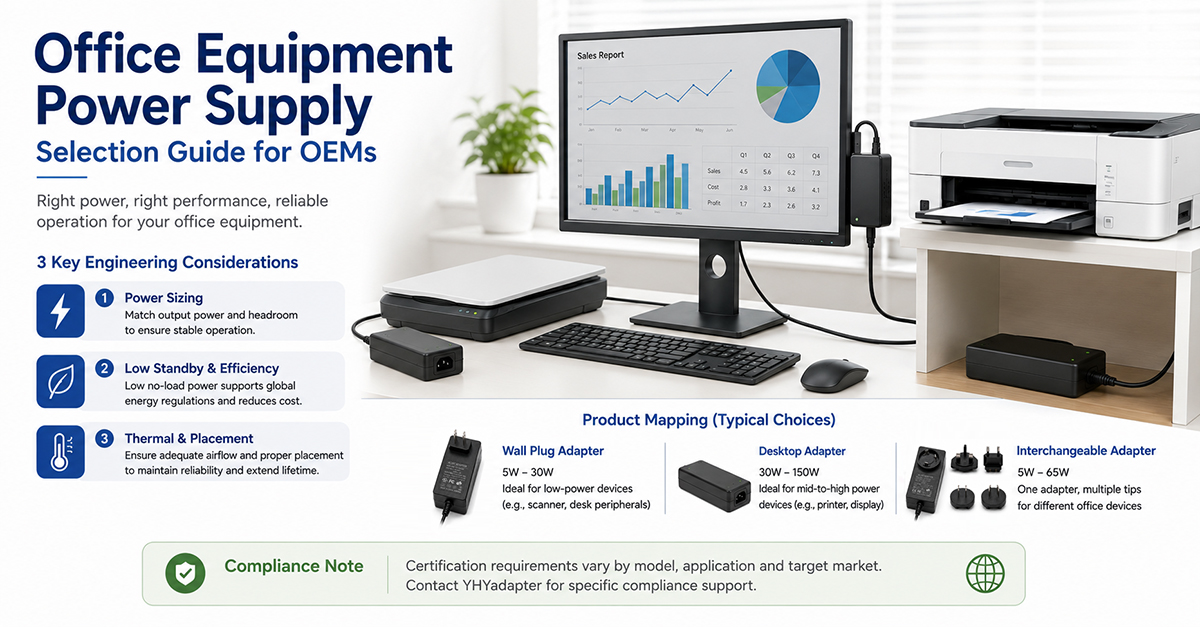
Office equipment encompasses a diverse range of devices, each with distinct power supply requirements. A laser printer’s fuser requires high power for short durations to melt toner onto paper. A scanner must deliver consistent power to the motor drive and imaging sensor over extended scanning sessions. A modern thin monitor depends on an external adapter for its panel backlight and processing circuits. A docking station must simultaneously power a laptop, monitor, and peripherals from a single adapter.
This guide covers application-specific power supply considerations for the most common office equipment types: printers, scanners, monitors, and docking stations, with practical design guidance for OEMs.
Printer Power — Fuser Cycles and Peak Current
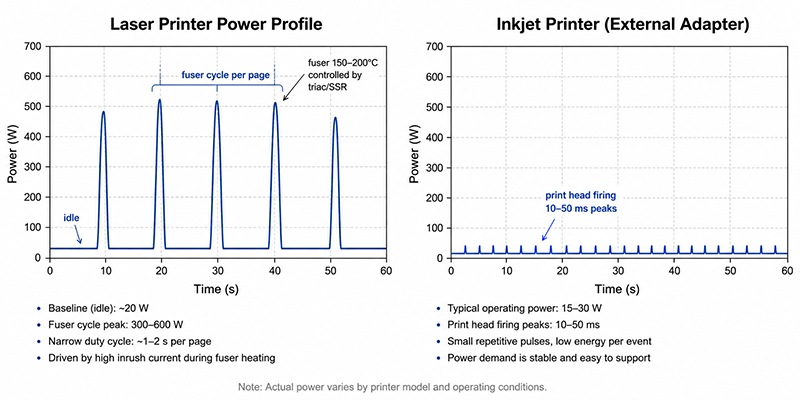
Printers have the most demanding power profile among office equipment due to the fuser, which heats to 150–200°C to melt toner onto paper. The fuser draws high power during printing cycles but is off or at reduced temperature between prints.
Power Profile by Printer Type
| Printer Type | Peak Power (Printing) | Idle Power | Sleep Power | Notes |
|---|---|---|---|---|
| Inkjet (desktop) | 15–30W | 3–8W | 1–3W | Low power; no fuser; external adapter common |
| Inkjet (multifunction) | 20–40W | 5–10W | 2–4W | Scanner adds power for document feeder |
| Laser (personal, desktop) | 300–600W | 10–30W | 2–5W | Fuser requires high peak power; internal PSU typical |
| Laser (workgroup) | 600–1500W | 20–50W | 3–10W | Higher speed = higher fuser power; 15–20A circuit may be required |
| Color laser | 400–1200W | 20–50W | 3–10W | Multiple fuser rollers or higher temperature |
| Large-format printer | 100–500W | 15–40W | 3–8W | Motor power for media feed; heater for drying |
Fuser Power Management
- Fuser heater: 200–1000W peak (duty-cycled)
- DC power supply (logic, motors, scanner): 30–100W continuous
- The DC supply is typically separate from the fuser power circuit, with the fuser powered directly from the AC rectified bus
External Adapter vs Internal PSU
- The adapter must provide consistent voltage under the pulsed load of the print head (short-duration current peaks during printing)
- The adapter’s OCP should not trip on print head current pulses
- The adapter must support the printer’s sleep mode with low power draw (1–3W)
Why This Matters
- The fuser’s peak power dominates the power supply design for laser printers, requiring either an internal PSU or a dedicated fuser power circuit.
- For inkjet printers with external adapters, the adapter must handle the print head’s pulsed current without voltage sag that could affect print quality.
- Printer sleep mode power is regulated by ENERGY STAR and ErP requirements. The adapter’s no-load power contributes to the sleep-mode total.
What OEMs Should Do Now
- For laser printers, design the fuser power circuit separately from the DC logic supply. The fuser draws power directly from the AC rectified bus, not through the DC adapter.
- For inkjet printers with external adapters, verify that the adapter’s output voltage remains stable during print head firing pulses (typically 10–50ms, 1–3A peaks).
- Select an adapter with low no-load power (≤0.15W) for inkjet printers to support ENERGY STAR and ErP compliance in sleep mode.
Scanner Power — Motor Drive and Sensor Requirements
| Scanner Type | Typical Power Range | Common Voltages | Adapter Form Factor |
|---|---|---|---|
| Desktop flatbed | 10–25W | 12V, 24V | Desktop adapter |
| Document scanner (sheet-feed) | 15–40W | 24V | Desktop adapter |
| Large-format scanner | 30–80W | 24V, 48V | Desktop adapter |
| Multifunction (scanner + printer) | Included in printer power | — | Integrated or shared |
Power Profile
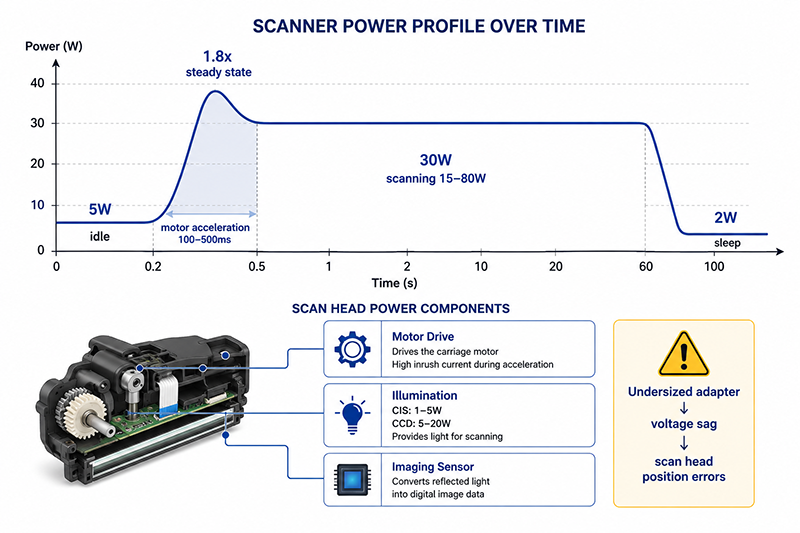
- Idle (ready): 2–8W
- Scanning (motor + sensor + illumination): 15–80W depending on speed and format
- Motor peak (acceleration): 1.5–2× steady-state motor current for 100–500ms
- Sleep (after timeout): 1–3W
Motor Drive Considerations
The scanner’s motor drive creates pulsed current draw during acceleration and deceleration. The adapter must maintain stable voltage during these transients, particularly for scanners used in continuous operation (batch scanning).
Illumination Power
- CIS (Contact Image Sensor): Uses integrated LED illumination, typically 1–5W
- CCD (Charge-Coupled Device): Requires fluorescent or LED lamp illumination, typically 5–20W
Why This Matters
- A scanner’s motor acceleration current can cause voltage sag on an undersized adapter, resulting in scanning speed variations or scan head position errors.
- Scanners used for batch scanning (continuous operation for hours) require adapters rated for continuous load at the scanning power level, not just the average power over a full scan cycle.
- The illumination source power should be included in the adapter power budget. CCD-based scanners with fluorescent lamps have higher illumination power than CIS-based scanners.
What OEMs Should Do Now
- Calculate the scanner’s peak power requirement including motor acceleration and illumination startup. Select an adapter with adequate peak current capability.
- For batch-scanning applications, verify the adapter’s continuous rating at the expected scanning power level, accounting for thermal derating.
- Specify an adapter voltage (typically 24V) that provides adequate headroom for motor drive and illumination circuits without excessive conversion losses.
Monitor Power — External Adapters and LED Backlight
| Monitor Size | Typical Power | Common Adapter | Backlight Type |
|---|---|---|---|
| 21–24 inch | 20–35W | 19V/2.1A (~40W), 12V/3A (36W) | LED edge-lit |
| 27 inch | 25–45W | 19V/2.1–2.5A (40–48W) | LED edge-lit |
| 32 inch | 40–70W | 19V/3.4A (65W), 24V/2.7A (65W) | LED direct-lit |
| 34+ inch (ultrawide) | 50–100W | 19V/4.7A (90W), 24V/4.2A (100W) | LED direct-lit or mini-LED |
| Professional (reference) | 60–120W | 24V/5A (120W), internal on larger units | LED or OLED |
19V Adapter Standard
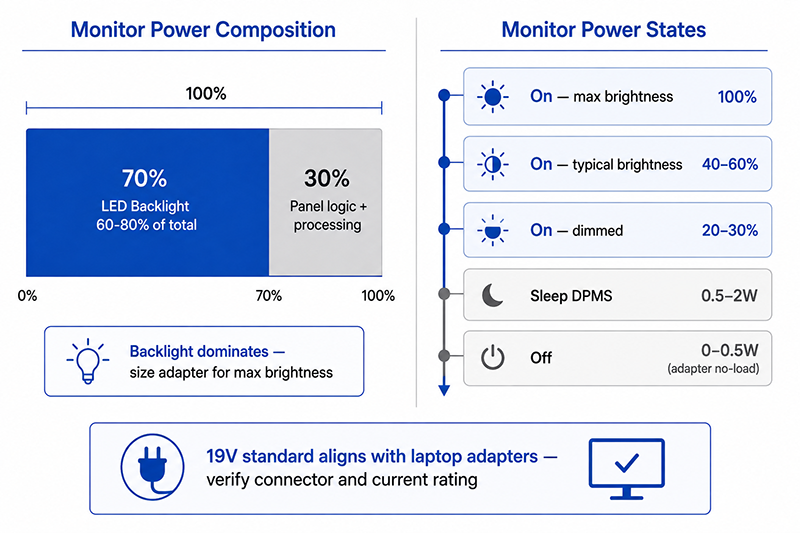
The 19V output is common for monitors because it aligns with the laptop power adapter standard (19V–20V). This allows monitors to potentially share adapters with laptops, though the connector type and current rating must be compatible.
Backlight Power
- Auto-brightness (ambient light sensor): Reduces backlight at low ambient light
- User brightness setting: Typical user setting is 30–60% of maximum
- Dynamic dimming: Reduces backlight in dark scene content
Power Management States
| State | Power Consumption | Description |
|---|---|---|
| On (max brightness) | 100% | Full operation, maximum backlight |
| On (typical brightness) | 40–60% | Typical user setting |
| On (dimmed) | 20–30% | Low brightness for dark environments |
| Sleep (DPMS) | 0.5–2W | Display turned off by computer, low-power state |
| Off (power switch off) | 0–0.5W | Adapter no-load power if adapter is still connected |
Why This Matters
- The 19V adapter standard for monitors aligns with laptop adapters, enabling potential cross-compatibility, though connector compatibility must be verified.
- The monitor’s backlight power dominates total consumption. Adapter selection should be based on the monitor’s maximum power at maximum brightness, not typical usage.
- Monitor sleep mode power is regulated by ENERGY STAR. The adapter’s no-load power of 0.1–0.3W contributes to the 0.5–2W sleep mode total.
What OEMs Should Do Now
- Select an adapter rated for the monitor’s maximum power at maximum brightness, plus 20% margin for thermal derating.
- Specify an adapter voltage (typically 19V or 24V) that provides adequate headroom for the backlight boost converter and panel logic circuits.
- Verify the adapter’s no-load power contributes to meeting ENERGY STAR sleep-mode limits. An adapter with ≤0.15W no-load is preferred.
Docking Station Power
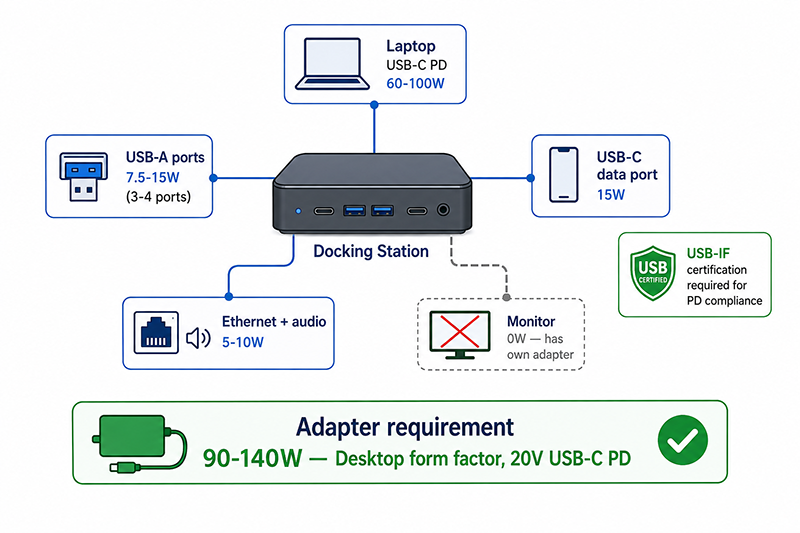
Power Budget for a Typical Docking Station
| Output | Typical Power | Notes |
|---|---|---|
| Laptop (USB-C PD) | 60–100W | USB-C PD 3.0, 20V at 3–5A |
| Monitor (HDMI/DP) | 0W (monitor has own adapter) | Docking station does not power monitor directly |
| USB-A ports (3–4 ports) | 7.5–15W (2.5W per port typical) | Standard USB downstream charging |
| USB-C data port | 15W (5V/3A) | For phone or accessory charging |
| Ethernet + audio + other | 5–10W | Internal hub, audio codec, status LEDs |
| Total adapter requirement | 90–140W | Depends on laptop power delivery specification |
Adapter Requirements
| Requirement | Typical Specification | Notes |
|---|---|---|
| Output voltage | 20V (USB-C PD) | USB-C PD uses 20V for high-power delivery |
| Continuous power | 90–140W | Desktop adapter, typically with 3-prong IEC inlet |
| Output connector | USB-C (captive cable) or barrel (docking station input) | USB-C PD simplifies laptop cable; barrel input is common for dock input |
| Certification | UL/CE/FCC + USB-IF for PD | USB-IF certification required for PD compliance |
USB-C PD Considerations
Docking stations using USB-C PD must support the appropriate power profiles for the target laptops. USB-C PD 3.0 supports up to 100W (20V/5A) with standard cables, and PD 3.1 with EPR (Extended Power Range) supports up to 240W. The adapter must be USB-IF certified for PD compliance for reliable operation with a range of laptops.
Why This Matters
- A docking station adapter must provide enough power for the laptop plus internal hub functions. An undersized adapter may charge the laptop slowly or not at all while the laptop is under load.
- USB-C PD adapters must be USB-IF certified for compatibility. Non-certified adapters may not negotiate power correctly with all laptops.
- Docking station adapters are among the highest-power external adapters in office equipment, typically 90–140W in a desktop form factor.
What OEMs Should Do Now
- Calculate the docking station’s total power requirement including laptop power delivery (at the laptop’s maximum charging rate) plus all USB ports at maximum load.
- Select a USB-IF certified PD adapter if the docking station uses USB-C for power delivery. Verify PD compatibility with target laptop models.
- Specify an adapter with adequate thermal derating margin—docking stations often operate for extended periods, and the adapter may be placed in a confined desk area.
Q: Can I use a 19V laptop adapter to power a 19V monitor?
A: If the voltage matches and the current rating is equal to or greater than the monitor’s requirement, the adapter should power the monitor. However, the connector type, polarity, and center pin size must match. Verify all specifications before using a non-dedicated adapter.
Q: Why do laser printers use internal power supplies instead of external adapters?
A: Laser printers require high power for the fuser (300–1500W peak), which is beyond the practical range of external desktop adapters. The fuser power circuit is typically designed as a separate high-voltage AC-switched circuit within the printer, not through the DC adapter. Inkjet printers with lower power requirements (<40W) commonly use external adapters.
Q: What power adapter do I need for a docking station that supports 100W laptop charging?
A: A docking station that delivers 100W to the laptop via USB-C PD requires an adapter rated for at least 120–140W to power the laptop plus the dock’s internal circuits. The adapter should be USB-IF certified for PD 3.0 compliance and provide 20V output at 5A or higher (100W+).
Conclusion
Office equipment power supply requirements vary significantly by device type. Printers, particularly laser printers with fusers, have high peak power demands that often require internal PSUs. Scanners need consistent power for motor drive and illumination over extended scanning sessions. Monitors commonly use 19V external adapters with power management states that reduce average consumption. Docking stations require the highest power among office peripherals, typically 90–140W, with USB-C PD certification for laptop compatibility. Each application requires matching the adapter’s power rating, voltage, and features to the specific device requirements.
Related Resources
🔌 Related Products
🏭 Related Applications
📖 Related Guides
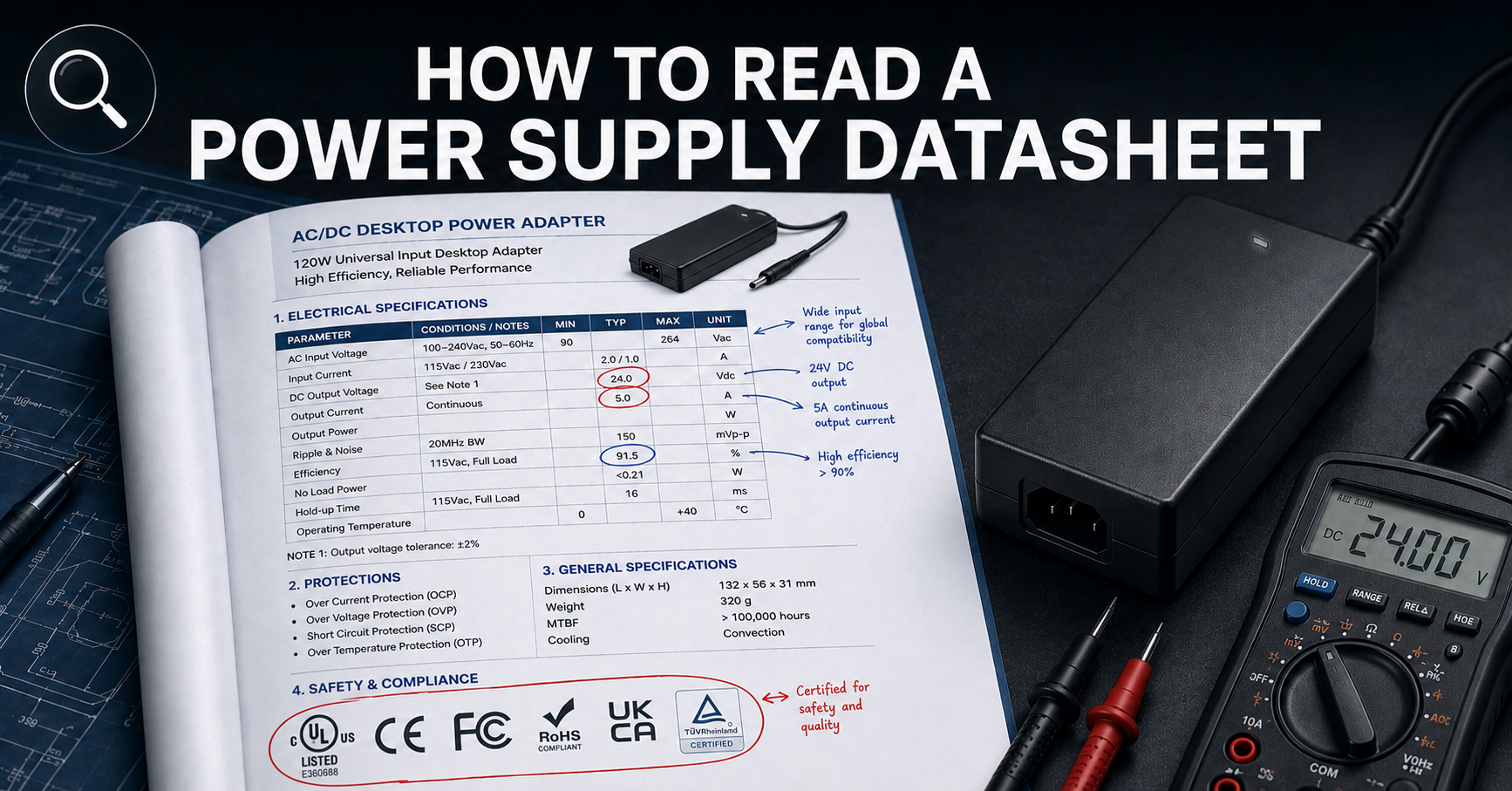
How to Read a Power Supply Datasheet
Learn how to evaluate connector specifications in a datasheet — current ratings, derating curves, certification verification.

✅ Related Certifications
UL 62368-1 Safety Certification
Safety standard covering connector creepage/clearance, temperature rise, and strain relief requirements for IT/AV equipment power adapters.