
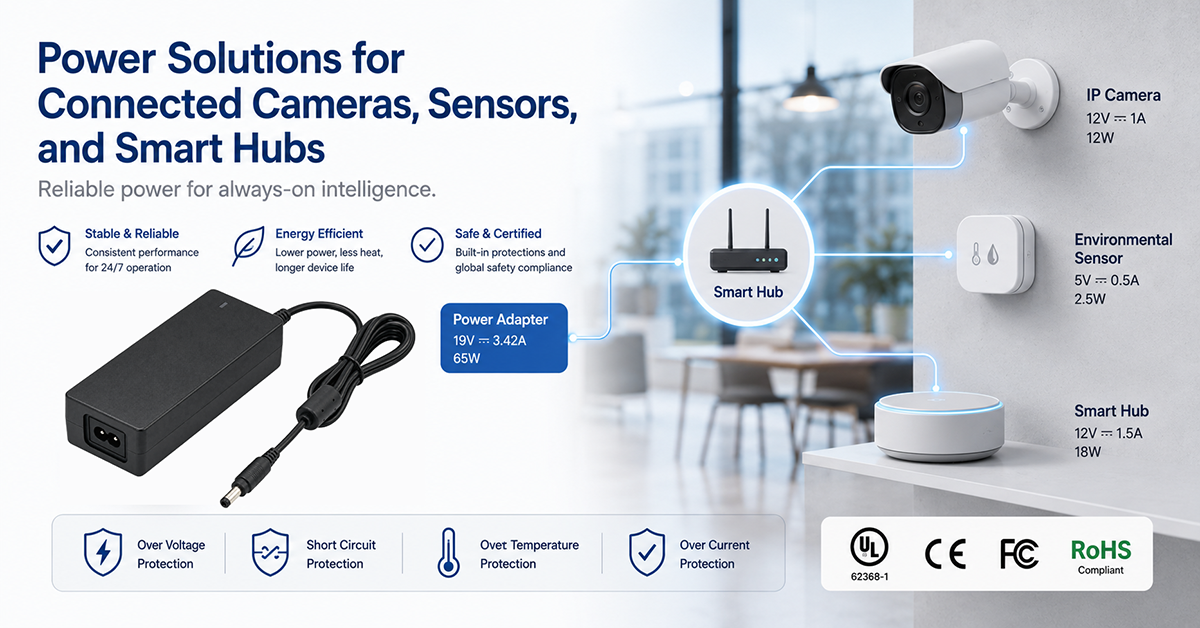
Connected cameras, sensors and smart hubs form the backbone of a connected building or smart home system, and each device type has a distinct power profile. A camera streams continuously, a battery sensor sleeps between reports, and a hub stays on to keep the network and the automation running. The supply has to match the behaviour of the device, not just its average wattage.
This guide covers the power considerations for connected cameras, sensors and smart hubs used indoors: the power options available, how each device type draws current, how a hub’s always-on architecture differs, and the selection criteria an OEM should apply.
YHYadapter product positioning: YHYadapter provides regulated constant-voltage (CV) AC/DC power adapters. PoE switches, injectors and networking equipment are supplied by their own manufacturers; where this guide refers to PoE, it describes an industry power option rather than a YHYadapter product.
Power Options for Connected Devices
A connected device can be powered in several ways, and the choice follows the installation rather than the device class alone.
| Power source | Typical power available | Advantages | Trade-offs |
| AC/DC adapter (wall plug or desktop) | Depends on the model and the device | Simple installation, no data cabling needed | Needs a mains outlet near the device; the adapter and its cord take space |
| PoE (IEEE 802.3af) | Up to 15.4 W at the port (12.95 W at the device) | One cable carries power and data | Needs a PoE switch or injector; limited by cable length |
| PoE+ (IEEE 802.3at) | Up to 30 W at the port (25.5 W at the device) | More power for pan, tilt and zoom | Higher switch cost |
| PoE++ (IEEE 802.3bt) | Higher port power for demanding devices | Supports devices with higher draw | Specialised switch required |
| Battery | Limited by battery capacity | No wiring; flexible placement | Requires recharging or replacement; duty cycle limited |
The adapter path suits devices that have a mains outlet available and do not need power over the data cable. The PoE path suits devices where one cable is worth more than the extra switch cost.
Power Requirements by Device Type
The three device types in a connected system behave differently on the supply.
Cameras. A camera’s draw depends on its sensor, its processor and any illumination. Constant streaming keeps the load steady, while illumination can add a step. Where the device also drives a motor for pan and tilt, the peak is part of the specification rather than an occasional event.
Sensors. Many sensors are battery powered and spend most of their time asleep, waking to measure and report. Their supply question is dominated by duty cycle and by the energy cost of each wake cycle, which is a design decision rather than a supply-selection one.
Hubs and bridges. A hub is always on. It maintains the network, runs the automation logic and often provides the radio links to the rest of the system. Its draw is modest but continuous, and it is the device that suffers most visibly when its supply is marginal.
Battery-Powered Sensors and Duty Cycle
A battery-powered sensor is designed around its wake cycle. Each wake consumes energy for the measurement, the processing and the radio transmission, and the intervals between wakes set the average draw.
What shapes the energy budget:
- The time the radio is active, which often dominates the wake cost
- The measurement front end and how long it must settle
- The processing needed to decide whether to report
- The quiescent current between wakes, which matters because it applies all the time
For an OEM, the useful exercise is to estimate the average draw over a realistic usage pattern rather than the peak. Where a sensor is mains powered instead, the same duty cycle defines what the supply has to tolerate.
Smart Hub and Bridge Power Architecture
A hub concentrates several functions into one enclosure: a processor, radio sections for the protocols it supports, and often a network interface. Its power architecture has to serve all of them from one supply.
Considerations that recur:
- Rail separation. Digital processing and radio sections benefit from a supply arrangement that keeps their noise from reaching each other.
- Continuous operation. A hub runs continuously, so its supply is specified for its continuous duty position rather than for a peak.
- Thermal behaviour. A closed hub enclosure can run warm, and the local ambient is the temperature the supply sees.
- Protection of the automation. If the hub controls devices in the building, a supply interruption is a functional event, not only a power event.
Adapter Selection Considerations
For connected devices powered by an external adapter, the selection follows the usual engineering questions.
- Voltage and tolerance. The device’s nominal rail is only part of the requirement; the tolerance it can accept, and under what conditions, completes it.
- Continuous and peak current. A camera’s illumination or a motor’s startup is a peak case that belongs in the specification.
- Connector and cable. The interface decides retention and service, and the cable is part of the electrical path.
- Duty cycle. Streaming and always-on operation define the continuous case; intermittent devices define a different one.
- Mounting. Where the adapter sits, and how it is retained, follows from how the product is installed.
Certification availability for a given adapter is by model and depends on the model and the target market.
Thermal and Installation Considerations Indoors
A connected device is usually installed inside a building, in an enclosure, behind furniture or in a ceiling void. That placement is what sets the supply’s environment.
- The local ambient around the adapter, which can be warmer than the room
- Airflow, or its absence, where the adapter is enclosed
- The clearance needed for the cord and the connector
- Service access, since these devices are replaced rather than repaired on site
Where the adapter is placed inside a sealed enclosure, the thermal path becomes the design case, and the derating position is worth checking against the actual installation rather than the bench.
Reliability for Always-On Equipment
Devices that never switch off accumulate operating hours faster than equipment that runs intermittently. That changes what reliability means in practice.
- Component selection and derating are more consequential, because the load is continuous
- Thermal behaviour is continuous too, so the steady-state temperature matters more than a short peak
- Protection behaviour matters at the system level, since an unplanned reset is a service event
Specifying for the continuous position, rather than for a peak that never occurs, is what keeps an always-on device in service.
Frequently Asked Questions
Does a connected camera need a different supply from an ordinary device?
It needs a supply specified for its actual load profile. A camera streams continuously and may add illumination or motor peaks, so the continuous case and the peak case both belong in the requirement.
When does PoE make more sense than an adapter?
When one cable carrying both power and data is worth more than the cost of a PoE switch or injector, and when the cable length stays within the limit for the standard in use. It is an installation decision as much as an electrical one.
How should a battery-powered sensor’s power be planned?
Around its duty cycle rather than its peak. Estimating the average draw over a realistic wake pattern is more useful than sizing for the moment the radio transmits.
Why does an always-on hub need particular attention?
Because it accumulates operating hours continuously and often sits in a closed enclosure. Component derating and the steady-state temperature matter more than a short peak.
Is certification the same for every connected device?
No. Certification availability is by model and depends on the model and the target market, so the applicable requirements are confirmed for the specific product and destination.