
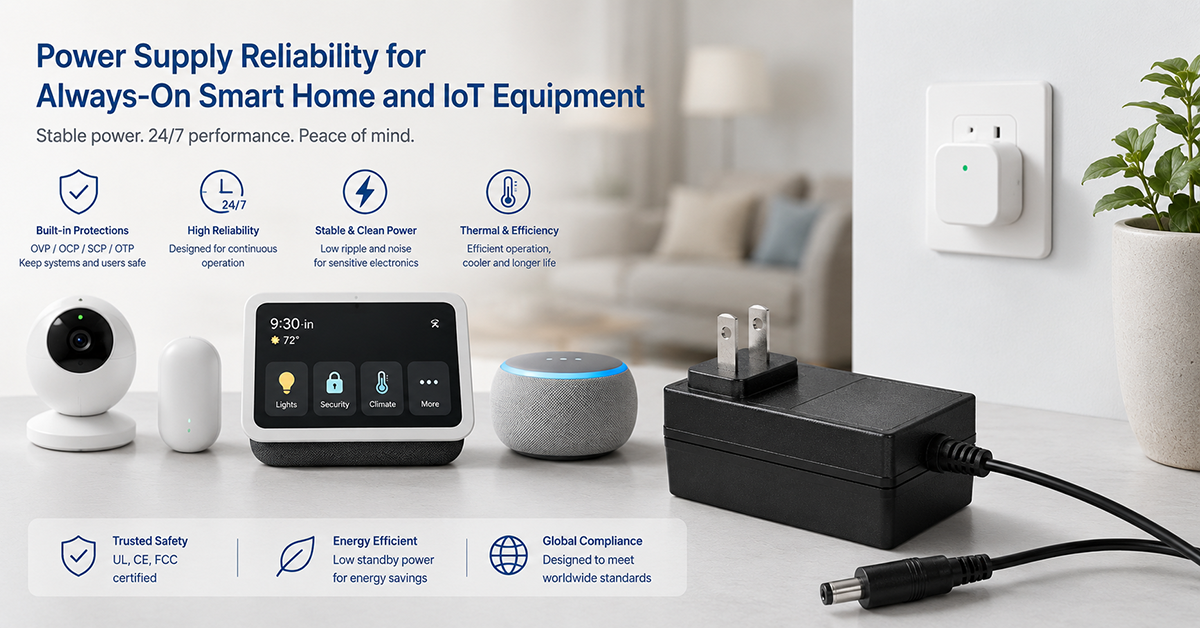
Smart home and IoT devices operate fundamentally differently from traditional consumer electronics: they are designed to run 24 hours a day, 365 days a year, often for years without interruption. A smart speaker, security camera, or sensor hub may accumulate 20,000–40,000 operating hours over its service life—comparable to industrial equipment rather than consumer electronics. The power supply must be selected for this continuous duty cycle, not for the intermittent operation assumed in many consumer adapter designs.
This guide covers power supply reliability considerations specific to always-on smart home and IoT devices: adapter lifetime estimation, capacitor aging in continuous operation, brownout and surge tolerance, thermal derating, and practical reliability design strategies.
Adapter Lifetime in Continuous Operation
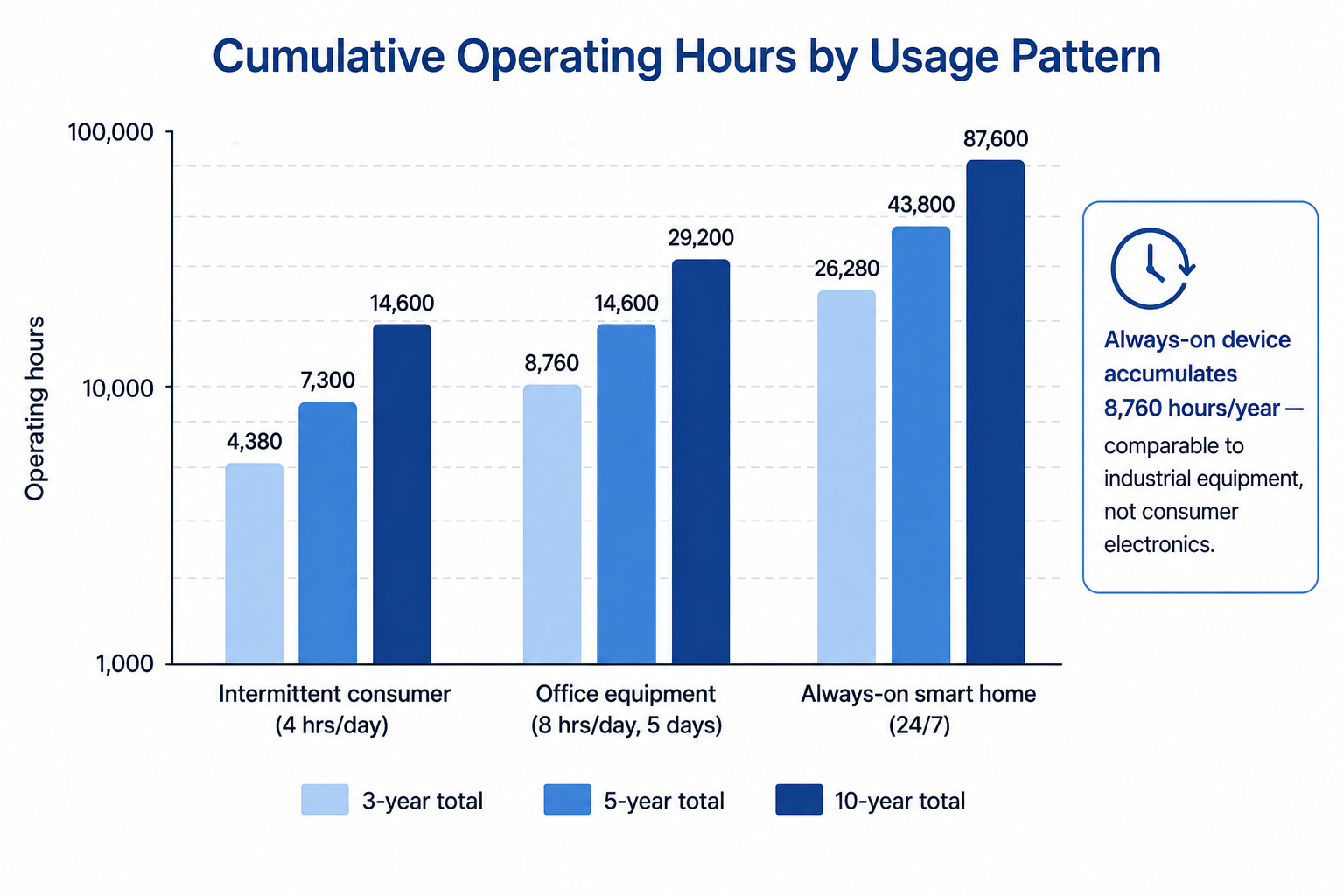
The most significant difference between always-on and intermittent use is the accumulation of operating hours. A smart home adapter running 24/7 accumulates 8,760 hours per year—equivalent to approximately 8–10 years of typical use for an intermittently operated consumer device.
Operating Hour Comparison
| Usage Pattern | Hours/Year | 3-Year Total | 5-Year Total | 10-Year Total |
|---|---|---|---|---|
| Intermittent consumer (4 hrs/day) | 1,460 | 4,380 | 7,300 | 14,600 |
| Office equipment (8 hrs/day, 5 days) | 2,080 | 6,240 | 10,400 | 20,800 |
| Always-on smart home (24/7) | 8,760 | 26,280 | 43,800 | 87,600 |
Primary Wear-Out Mechanism
The adapter’s electrolytic capacitors are typically the components that determine its useful life. Capacitor lifetime is primarily influenced by operating temperature. The 10°C lifetime-doubling rule is a common engineering approximation for aluminum electrolytic capacitors: for every 10°C reduction in core temperature, the expected lifetime approximately doubles. This approximation is subject to the manufacturer’s lifetime model, ripple current, voltage stress, and actual core temperature.
Example (illustrative)
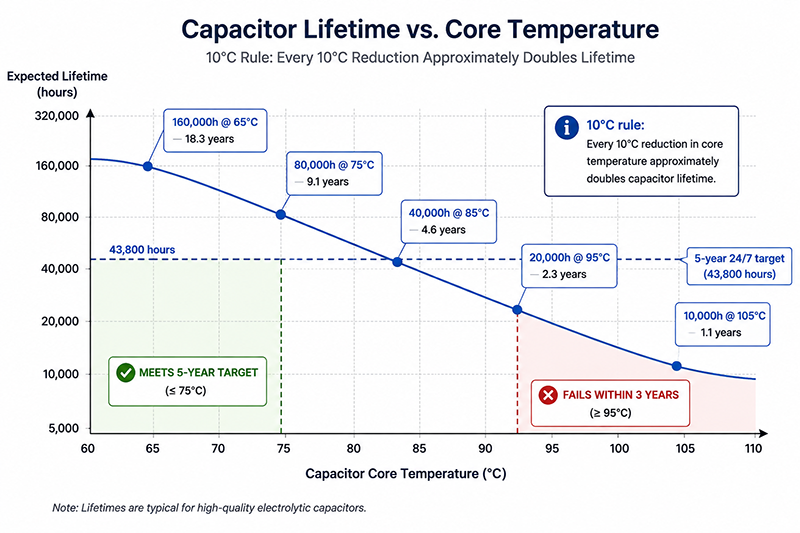
- At 95°C: ~20,000 hours (~2.3 years continuous)
- At 85°C: ~40,000 hours (~4.6 years continuous)
- At 75°C: ~80,000 hours (~9.1 years continuous)
- At 65°C: ~160,000 hours (~18.3 years continuous)
Selecting Adapters for Continuous Operation
| Selection Criterion | Recommendation | Reason |
|---|---|---|
| Capacitor temperature rating | 105°C rated preferred | Provides higher margin at actual operating temperature |
| Adapter derating | Select adapter at 120–150% of calculated max power | Lower load = lower internal temperature = longer capacitor life |
| Enclosed vs ventilated design | Prefer ventilated or metal-cased adapter | Better heat dissipation, lower capacitor temperature |
| Brand and quality | Established manufacturers with published lifetime data | Lifetime claims can be verified |
Why This Matters
- An adapter designed for intermittent consumer use (2,000–5,000 hour expected life) may fail within 1–2 years in a 24/7 smart home installation.
- Thermal management inside the smart home device affects adapter temperature. An adapter placed under a shelf, inside a cabinet, or near other heat-generating equipment runs hotter than one in open air.
- Capacitor aging is gradual. The device may develop increased ripple, reduced output capacity, or intermittent operation before complete failure.
What OEMs Should Do Now
- Select adapters with 105°C-rated capacitors and request lifetime data at the expected operating temperature and load from the manufacturer.
- Derate the adapter by selecting one rated for 120–150% of the calculated maximum continuous power.
- Consider the adapter’s installation environment in the device’s thermal design. Provide ventilation or separation from heat-generating components.
Brownout and AC Line Disturbance Tolerance
AC Mains Disturbances
| Disturbance Type | Typical Duration | Typical Magnitude | Effect on Adapter |
|---|---|---|---|
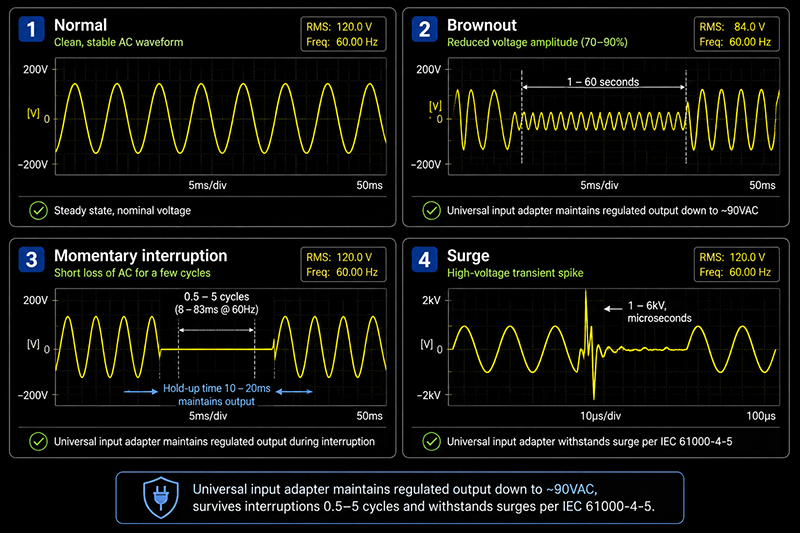
| Brownout (voltage sag) | 1–60 seconds | 70–90% of nominal | Output voltage may drop below regulation limit |
| Momentary interruption | 0.5–5 cycles | Complete loss | Output voltage drops, output capacitor supplies load |
| Surge (switching transient) | Microseconds to milliseconds | 1–6kV | May damage input components if protection is inadequate |
| Frequency deviation | 0.1–1 second | ±0.5–5 Hz | Most adapters tolerate ±3 Hz without issue |
| Harmonics on AC line | Continuous | Varies | Adapter with PFC is more tolerant of distorted waveforms |
Brownout Behavior
During a brownout, the adapter’s output voltage depends on the AC input voltage, the adapter’s minimum operating voltage, and the load current. A universal input adapter (100–240VAC) typically maintains regulated output down to approximately 90VAC. Below this threshold, the output voltage drops, potentially causing the device to reset or malfunction.
Hold-Up Time
The adapter’s hold-up time is the duration it can maintain regulated output after AC power is lost. Standard adapters typically provide 10–20ms hold-up time (one mains cycle at 50Hz or 60Hz). For smart home devices that need to maintain operation through brief interruptions, this is typically sufficient.
If the device requires longer hold-up time (e.g., to save state or send a notification before shutdown), additional bulk capacitance at the device’s power input is needed.
Why This Matters
- A smart home device that resets during a brownout loses network connectivity, may take 30–60 seconds to reconnect, and may miss events during the reconnection period.
- Brownouts are more common in some regions and seasons. Devices sold globally should be tested at 90VAC (the typical minimum for universal input adapters) to verify brownout tolerance.
- A momentary interruption of 0.5–1 cycle (8–16ms at 60Hz) is typically handled by the adapter’s hold-up time, but longer interruptions cause the device to restart.
What OEMs Should Do Now
- Test the complete device (adapter + product) at 90VAC input, full load, to verify stable operation during brownout conditions.
- Verify the adapter’s minimum operating voltage from the datasheet and confirm it matches the device’s target market AC mains quality.
- If the device requires operation through AC interruptions longer than 20ms, add bulk capacitance at the device input to extend hold-up time.
Surge Protection for Network-Connected Devices
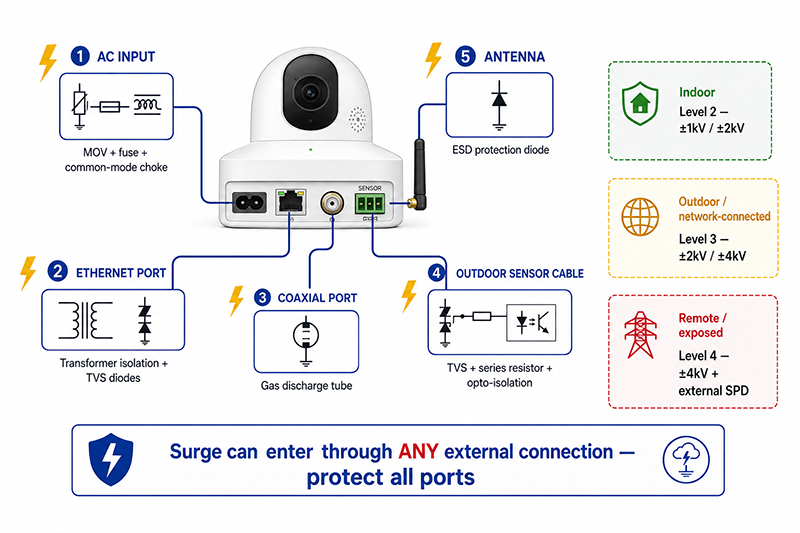
Surge Entry Points
| Entry Point | Typical Surge Source | Protection Strategy |
|---|---|---|
| AC mains input | Lightning, grid switching, nearby equipment | Internal MOV, fuse, common-mode choke |
| Ethernet/PoE port | Cable-coupled surges (long outdoor runs) | Ethernet transformer isolation, TVS diodes |
| Coaxial cable (camera) | Cable-coupled surges | Gas discharge tube, coaxial protector |
| Outdoor sensor wiring | Lightning-induced surges on external cables | TVS diodes, series resistors, opto-isolation |
| Antenna port (Wi-Fi/BT) | ESD from human contact | ESD protection diode |
Surge Protection Levels
- Indoor AC-powered devices: Level 2 (±1kV line-to-line, ±2kV line-to-ground) is typical
- Outdoor or network-connected devices: Level 3 (±2kV line-to-line, ±4kV line-to-ground) is recommended
- Remote or exposed installations: Level 4 (±4kV line-to-line, ±4kV line-to-ground) plus external SPD
Why This Matters
- A single surge event on the AC line or network cable can destroy an unprotected smart home device, causing data loss and service interruption.
- Outdoor cameras and sensors connected by long cable runs are at higher surge risk than indoor-only devices.
- Network-connected devices (Ethernet, PoE) need surge protection on both the AC input and the network port.
What OEMs Should Do Now
- Determine the surge exposure level for the device’s intended installation environment. Include surge protection appropriate to the installation category on all external connections.
- For outdoor or network-connected devices, specify adapters with integrated surge protection or add external protection components at the device input.
- Test the complete device for surge immunity per IEC 61000-4-5 at the level appropriate for the target market and installation type.
Reliability Design Checklist
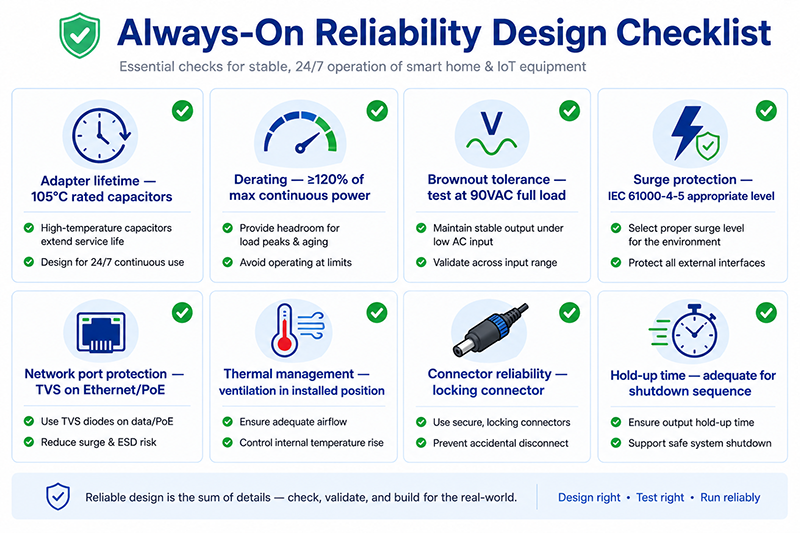
| Area | Check | Verification |
|---|---|---|
| Adapter lifetime | Capacitor rating (105°C preferred) | Manufacturer lifetime data at expected operating temperature |
| Adapter derating | Rated power ≥ 120% of calculated max continuous | Power budget measurement |
| Brownout tolerance | Stable operation at 90VAC input | Test at 90VAC, full load |
| Surge protection | AC input protection level matches installation | IEC 61000-4-5 test report |
| Network port protection | Ethernet/PoE port surge protection | TVS diode selection, certification test |
| Thermal management | Adapter ventilation in installed position | Temperature measurement in worst-case mounting |
| Connector reliability | Locking connector for portable devices | Mechanical retention test |
| Hold-up time | Adequate for device shutdown sequence | Oscilloscope measurement during power loss |
| Operating temperature range | Adapter rating exceeds expected ambient | Datasheet verification + thermal test |
Q: How long should a smart home power adapter last?
A: For a device expected to operate 24/7 for 5 years, the adapter should be rated for at least 43,800 hours of continuous operation at the expected operating temperature. Adapters with 105°C-rated capacitors are recommended, and the adapter should be derated (selected at 120–150% of calculated maximum power) to reduce thermal stress.
Q: My smart home device occasionally resets during hot summer days. What could be the cause?
A: High ambient temperature can cause the adapter to operate above its derating threshold, reducing its output capacity or triggering overtemperature protection. If the device is installed in an enclosed space or near other heat-generating equipment, the adapter may be operating beyond its rated temperature. Measure the adapter’s case temperature during hot ambient conditions and verify it is within the adapter’s specified range.
Q: Do I need a medical-grade adapter for a smart home health monitoring device?
A: The power supply requirements depend on the device’s medical classification. Smart home health monitoring devices (consumer-grade blood pressure monitors, pulse oximeters) typically do not require medical-grade adapters (IEC 60601-1) because they are not classified as medical electrical equipment. Devices intended for clinical use require appropriate medical certification. Verify the applicable regulatory classification for the specific device.
Conclusion
Power supply reliability for always-on smart home and IoT devices requires attention to factors that are less critical for intermittently used consumer electronics. The adapter’s capacitor lifetime, thermal derating, brownout tolerance, and surge protection must all be evaluated for continuous 24/7 operation. The key strategies are: selecting adapters with 105°C-rated capacitors and derating for continuous load, testing brownout tolerance at 90VAC, providing surge protection appropriate to the installation environment, and measuring operating temperature in the device’s installed configuration.
Related Resources
🔌 Related Products
🏭 Related Applications
Industrial Control Power Solutions
Power solutions for PLC, CNC, servo and automation equipment
📖 Related Guides
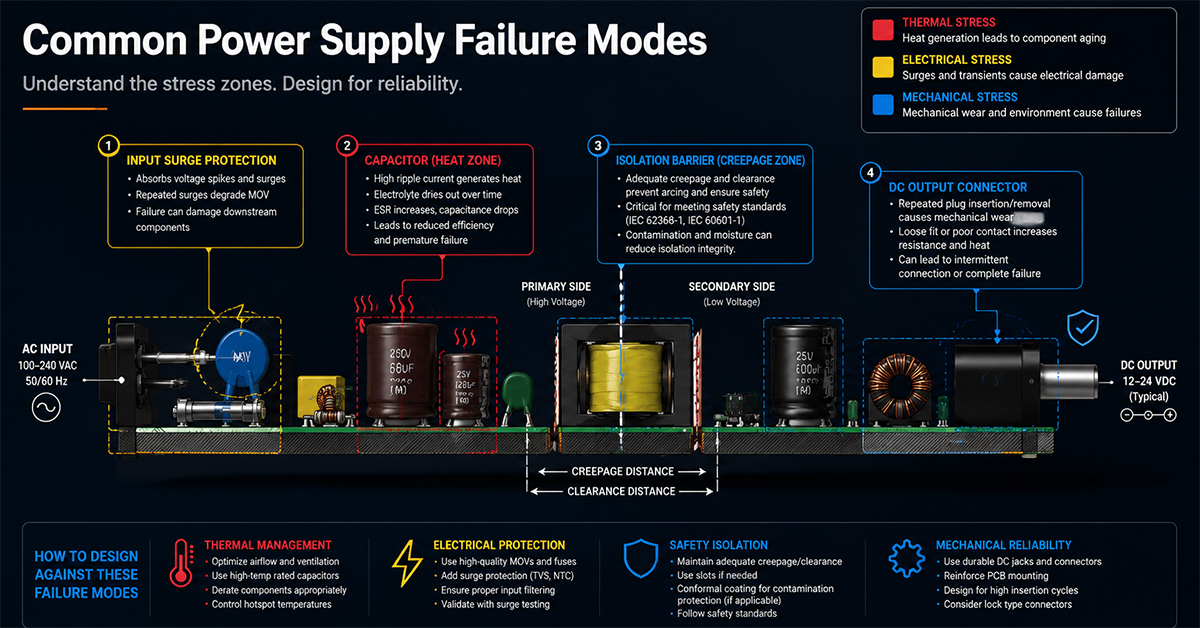
Common Power Supply Failure Modes
Common power supply failure modes and design countermeasures
✅ Related Certifications
UL 62368-1 Safety Certification
Safety standard covering connector creepage/clearance, temperature rise, and strain relief requirements for IT/AV equipment power adapters.